
Polyglot Data Model
Users may define structures once in a technology-agnostic polyglot data model, complete with denormalization and complex data types, then represent these structures in a variety of physical data models respecting the specific aspects of each target technology.
You may want to first read about the background for our polyglot data model approach, and as well as the definition of the polyglot data modeling concept.
The polyglot and target models are separate models. But they are related to ensure consistency. In other words, the behavior is similar to references to external definitions, but at the model level. The polyglot data model is the master, and targets models are dependent on the polyglot model. If changes are required to an object, they must be done in the polyglot model, then the target models must be updated to reflect the changes.
Exceptions are possible: some objects in a polyglot model can be flagged as polyglot-only so they do not appear in the target models. Conversely, you can deactivate entities and attributes in the target model, or you can add objects in the target models that are not reflected in the polyglot model. What is important, mostly, is that, if attributes or properties of an object change in the polyglot model, you may update dependent target models to reflect those changes.
Pull and Push from the target model
Users accustomed to legacy data modeling tools may have the reflex to want to generate a physical model from their logical model. The approach is different in Hackolade Studio where you must first create an empty model (which can be physical model, or another polyglot model), then derive from one or more polyglot models. If you wonder why we pull things this way, it is because a Hackolade model can be composed from parts of multiple models.
Naturally, if you have a physical model, created for example from a reverse-engineering operation, you can convert it to a polyglot model.
Derive from Polyglot Model
The derive operation allows you to create a model from a Polyglot model. The derived model can be a physical model, or another Polyglot model. A derived model depends on objects in the "parent" Polyglot model. Changes to objects in the parent Polyglot generally affect the derived objects in the derived model.
Selection during derivation
During the derive operation, you can choose which objects to include in the derived model. By default, all objects are selected, but you can restrict the scope to derive only a subset of the parent Polyglot model.
This selection defines the initial content of the derived model. After derivation, you can still change what you keep in the derived model: you may remove objects originally selected, or select at a later time objects that were not initially selected.
Deviations in derived models
A derived model is not a strict copy of the parent Polyglot model. After derivation, you can still add or remove objects, or modify properties to adapt the derived model to a specific technology or use case.
These changes are called deviations and represent behavior specific to the derived model. A derived model may therefore represent only part of its parent Polyglot model(s) and evolve beyond its initial selection.
Polyglot-only property
Any modeling object in the Polyglot model can be marked with the Polyglot only property (available in the Properties pane and disabled by default).

When enabled, the object is never derived into any derived model, regardless of the selection made during derivation. This is a global rule. This is different from excluding objects during derivation, which only affects the current target model.
It is important to distinguish these concepts: The Polyglot only property defines objects that are never part of any derived model, while selection during derivation and subsequent changes define how a given derived model materializes and evolves relative to the parent Polyglot model.
How to derive
You can derive a target model either into a new model or into an existing model. Derivation can also be performed from a Polyglot model into another Polyglot model.
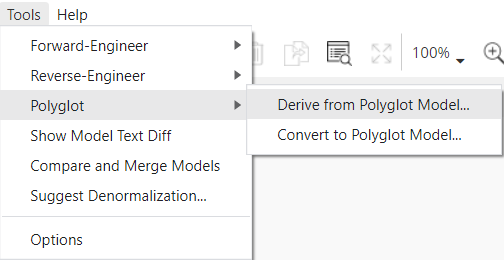
To start a derivation, use Tools > Polyglot > Derive from Polyglot Model. Alternatively, in the Properties Pane at the model level, you can view the list of Polyglot models from which the Model is derived and add a new one from there. A target model can be derived from one or more Polyglot models.
You may then choose the Polyglot data model file, either from a local file on your machine or from a remote location (for example within the same repository, another repository, or even a different Git provider).
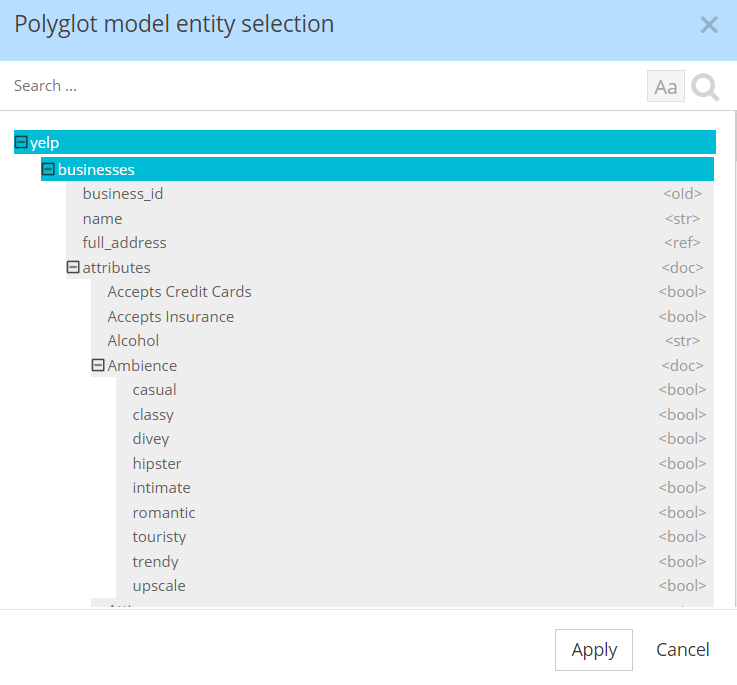
A dialog lets you narrow down the selection of containers, entities, and definitions to include. By default, all objects are selected.
Attribute-level selection
Attributes of entities cannot be individually deselected in this dialog. Depending on your use case, several approaches are available:
1. You can adjust the selection after derivation by removing or re-adding attributes in the target model. This is the most flexible option when the decision depends on a specific target implementation.
2. In the Polyglot model, each object, including attributes, can be marked as Polyglot only, meaning that it will never be included in any derived model. This is appropriate when the attribute is conceptually relevant but should never be materialized physically.
3. In a target model, you can deselect the IsActivated property, which keeps the attribute in the model but filters it out (or comments it if the target syntax allows it) in the generated script.

The choice between these options depends on whether the attribute should be excluded globally, excluded only for a specific target, or simply not generated in physical artifacts.
Convert a Model to Polyglot
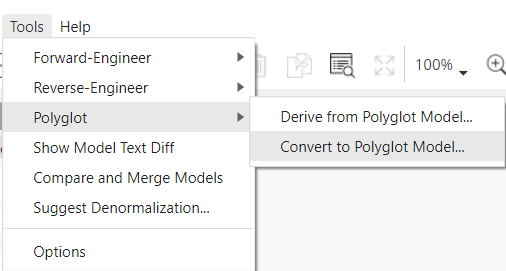
In many cases, you may start from an existing database by reverse-engineering it into a physical model, and then convert that model into a Polyglot model. This is done by opening the physical target model and selecting Tools > Polyglot > Convert to Polyglot Model...
You must choose whether to make your target dependent of the Polyglot model being created. This is the recommended approach as the Polyglot model should now become the master of changes, and the target model should be dependent of the Polyglot model.
You may then choose the location where you want to store the Polyglot model. You're now ready to maintain and update the polyglot data model.
Controlling what is converted
By default, all modeling objects are included in the conversion. There is no selection dialog during conversion, unlike when deriving from a Polyglot model. Instead, conversion includes all modeling objects that are not marked with the Exclude from polyglot convert property in the Properties Pane.
This property is disabled by default for all objects, which means they are included in the conversion. Views are the exception: they are excluded by default because they are often more physical than conceptual. If needed, you can still include specific views by disabling this property before running the conversion.
When the property is enabled on an object, that object is ignored during conversion and is not created in the Polyglot model.
Dependency Handling
When an object is excluded from conversion through the Exclude from polyglot convert property, all objects that depend on it are also excluded. This ensures that the resulting Polyglot model remains consistent and does not contain incomplete structures.
For example, if an entity is excluded, any relationship involving that entity is not transferred; if a definition is excluded, references to it are not included; and if a container is excluded, all of its contents are excluded as well.
Convert and Merge
When converting a target model to Polyglot, you can choose an existing Polyglot model. In this case, Studio merges the result of the conversion with the selected existing Polyglot model. This approach enables more advanced use cases, such as combining multiple physical models into a single Polyglot model or keeping the Polyglot model up-to-date with production database.
For more details and examples of these use cases, refer to the dedicated documentation page
Data type mapping
On the polyglot data model side, a long list of physical data types has been compiled across the different targets support by different Hackolade plugins. It was on purpose that this approach was decided instead of providing only a list of logical data types. That is so the most relevant level of granularity could be chosen at the polyglot level to be automatically mapped to the appropriate physical data type without minimal user intervention.
A data type matrix mapping table is used to provide bi-directional transformation: when converting a target model to polyglot, and when deriving a target model from polyglot.
Naming conventions
Polyglot models being technology-agnostic, it could be that only business names are created and maintained here.
Then when a physical model is derived for any target, it is often the case that the rules to generate physical names from business names are different. For example, in MongoDB, JSON, Avro, OpenAPI, developers tend to prefer camelCase, whereas some targets like Cassandra cannot have any upper case characters and therefore snake_case is a typical conversion.
To generate technical names in physical target models when deriving from a polyglot model, you must first enable Business-to-Technical coupling for the chosen target in Tools > Options > Naming Conventions. Target-specific transformations rules are applied during the process of deriving from the polyglot model.
Starting with v8.6.0, it is also possible to enable Naming Conventions in Polyglot models. The details are further described in this how-to guide and sub pages.
Maintain and update the target model
Once a target model has been created and derived from a polyglot model, it contains all the derived objects. You may make some changes to the target model:
- make changes to the properties of entities and attributes without changing them in the polyglot model. This is used if you need minor deviations;
- add new entities and views that are specific to the physical target model, for example based on access patterns;
- remove entities from the target model. This action does not delete the entity in the polyglot model;
- add, delete or modify attributes, again without effect on the Polyglot model.
You may also join entities from multiple polyglot models by repeating the operation to derive from polyglot.
You may supplement the target model with metadata, index and partitioning information specific to the target technology, then forward-engineer artifacts according to your use case.
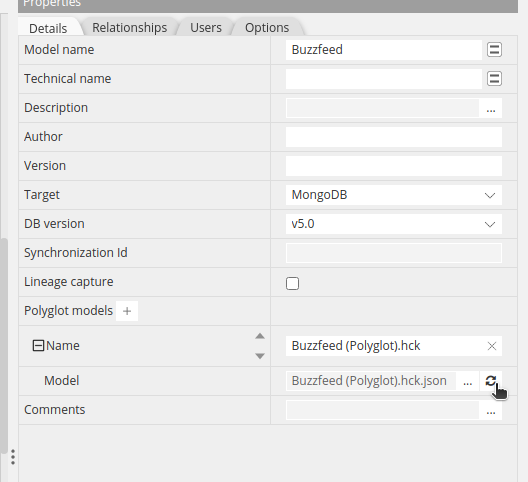
If the polyglot model changes during the time you're editing the target model, you may refresh the derived objects by clicking the update button which can be found in the model-level Properties Pane:
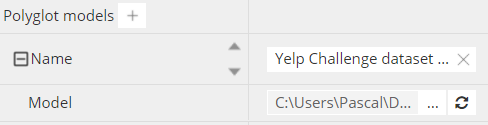
If you have multiple links, possibly to the same polyglot model so you can maintain different profiles, it may be useful to indicate a meaningful name for the link.
An impact analysis dialog is displayed to let you decide which objects to include as part of this refresh operation. Maybe these objects were not selected originally, or they could have been added to the polyglot model since the previous refresh or derive operation, or they could have been deleted in the target model.
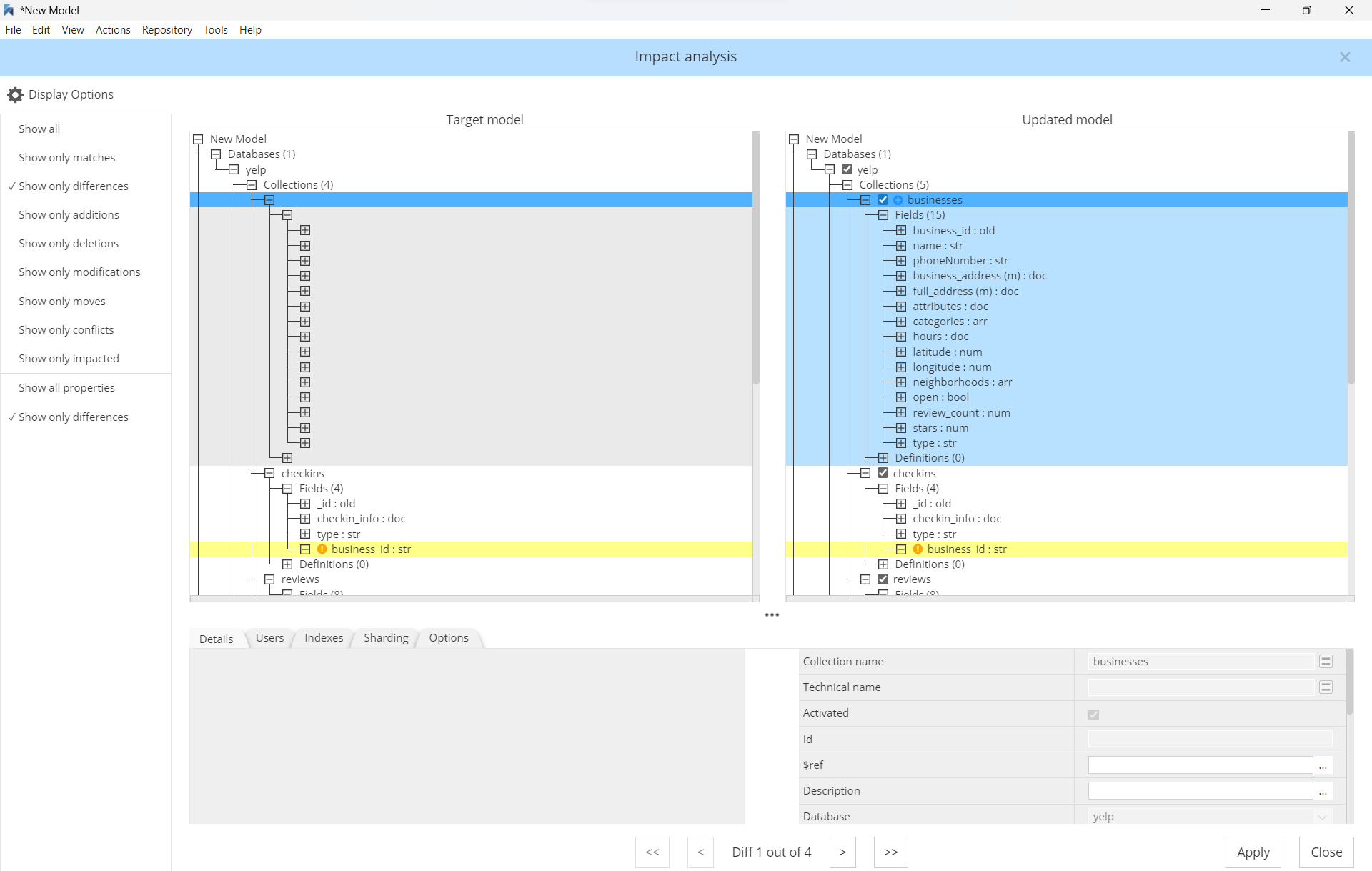
When opening a target model with a reference to one or more polyglot models, you are presented with the option to update the objects.
You may also permanently break the connection to the polyglot model. This operation should be done with care of course, as it cannot be re-established afterwards without restarting all the steps from scratch. The operation replaces all references to the objects of the polyglot model by the objects themselves. But further modifications in the polyglot model will no longer have any effect in the target model.
Advanced use cases
Attribute deviations
After deriving from a Polyglot model into any target, you may want to adjust the properties of some attributes, delete unneeded attributes, or add more attributes. From v5.4.0 it is possible to modify attribute properties, and from v6.6.4 it is possible to delete and insert attributes.
Doing deviations is simple, but be aware that some operations are restricted. For example, it is not allowed to change the data type of an attribute derived from a Polyglot model. The software behaves this way to avoid possible conflicts in the properties because each type has its own set of properties.
If you need such a change, you may either change the data type in the Polyglot model, then update the target model. Or you may delete the derived attribute in the target model, and create/insert a new one.
Other operations are restricted for derived attributes in target models:
- convert a regular attribute to pattern attribute
- convert a pattern attribute to a regular attribute
- replace a reference by its attributes (if the attribute is a reference to a udt/definition)
- change the “JSON Type” of an attribute (if type supports this)
All deviations are stored in the target model and don’t affect the base polyglot model.
Derive subsets from multiple polyglot models
The polyglot architecture provides tremendous power and flexibility. It is possible to derive a target model from multiple polyglot models, or subsets thereof:
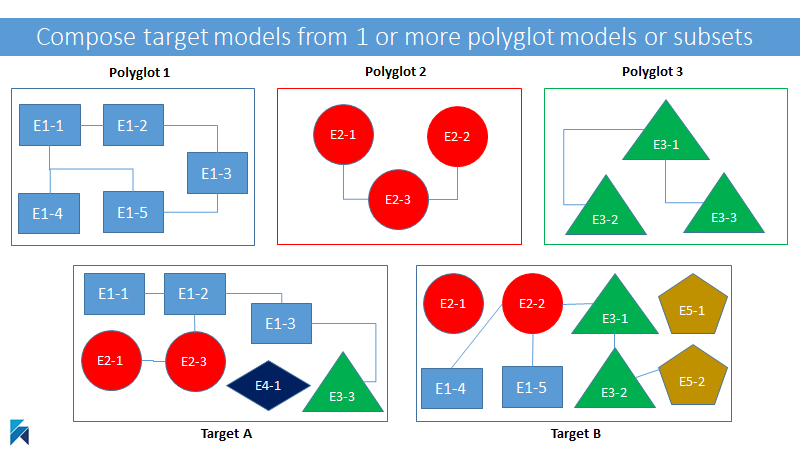
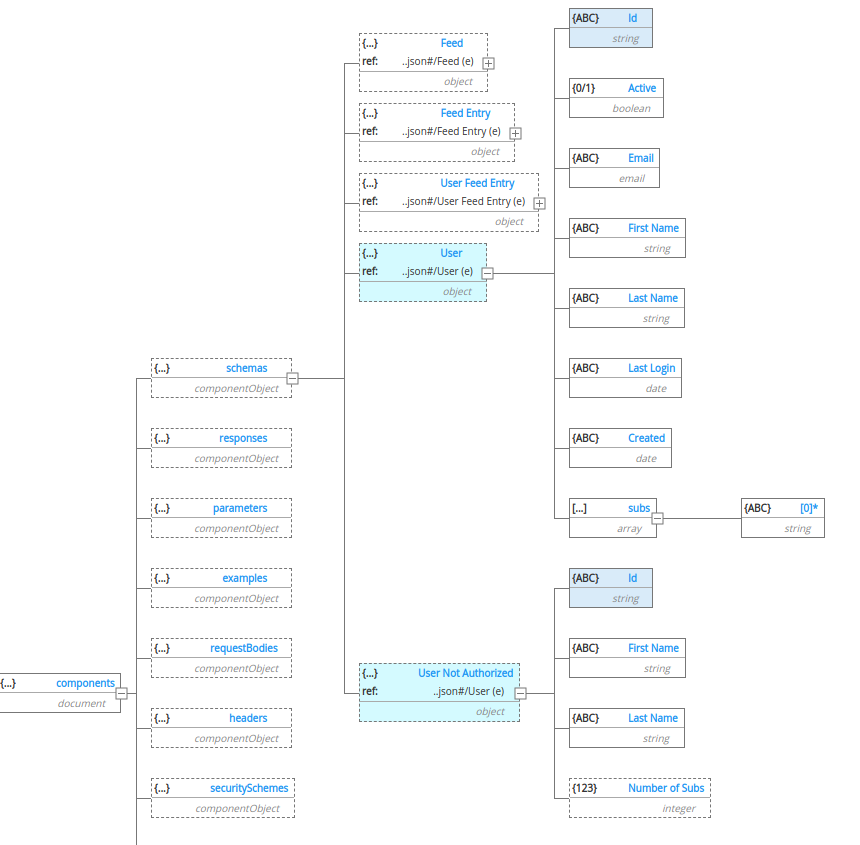
This is done in a target model by clicking the + sign in the model-level Properties Pane, and choosing an additional polyglot model from which to select the object or objects you wish to derive into your target model.
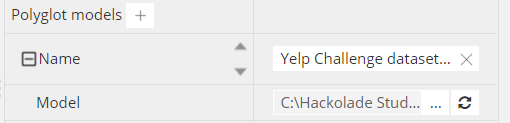
In some case, you may even have a use case to derive multiple subsets from the same polyglot model. An example if why you may want to do this is if you want different subsets and/or deviations from a given polyglot model in the same target model. In this OpenAPI model, different instantiations of the same User object are justified as you want a different response structure depending on whether a criteria was satisfied, or not.
Impact Analysis
The impact analysis window is an extended version of model comparison window. You may open this window by clicking the update button near the link to the Polyglot model on the properties pane, when the model is selected.
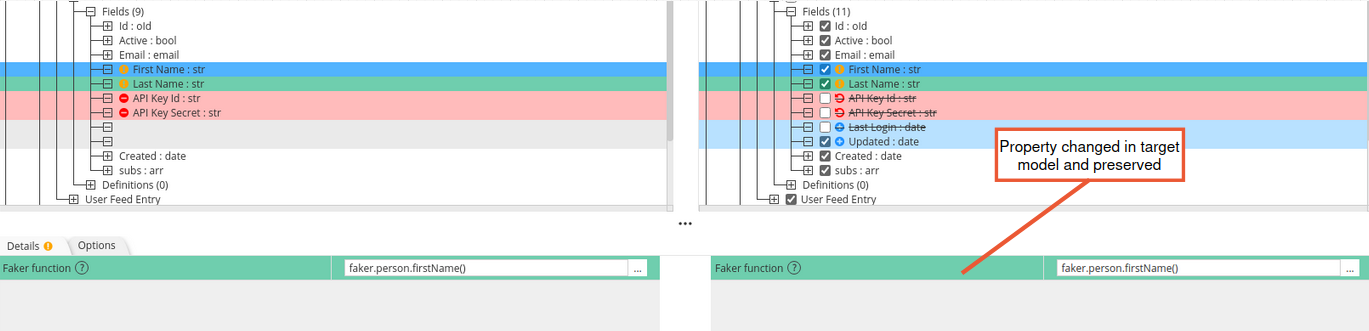
In the impact analysis window, all entities and attributes in the right-hand pane have checkboxes. The checked state means that this object will be included in the target model after the update. If you want an object to not appear in the target model, you should unchecked the box.
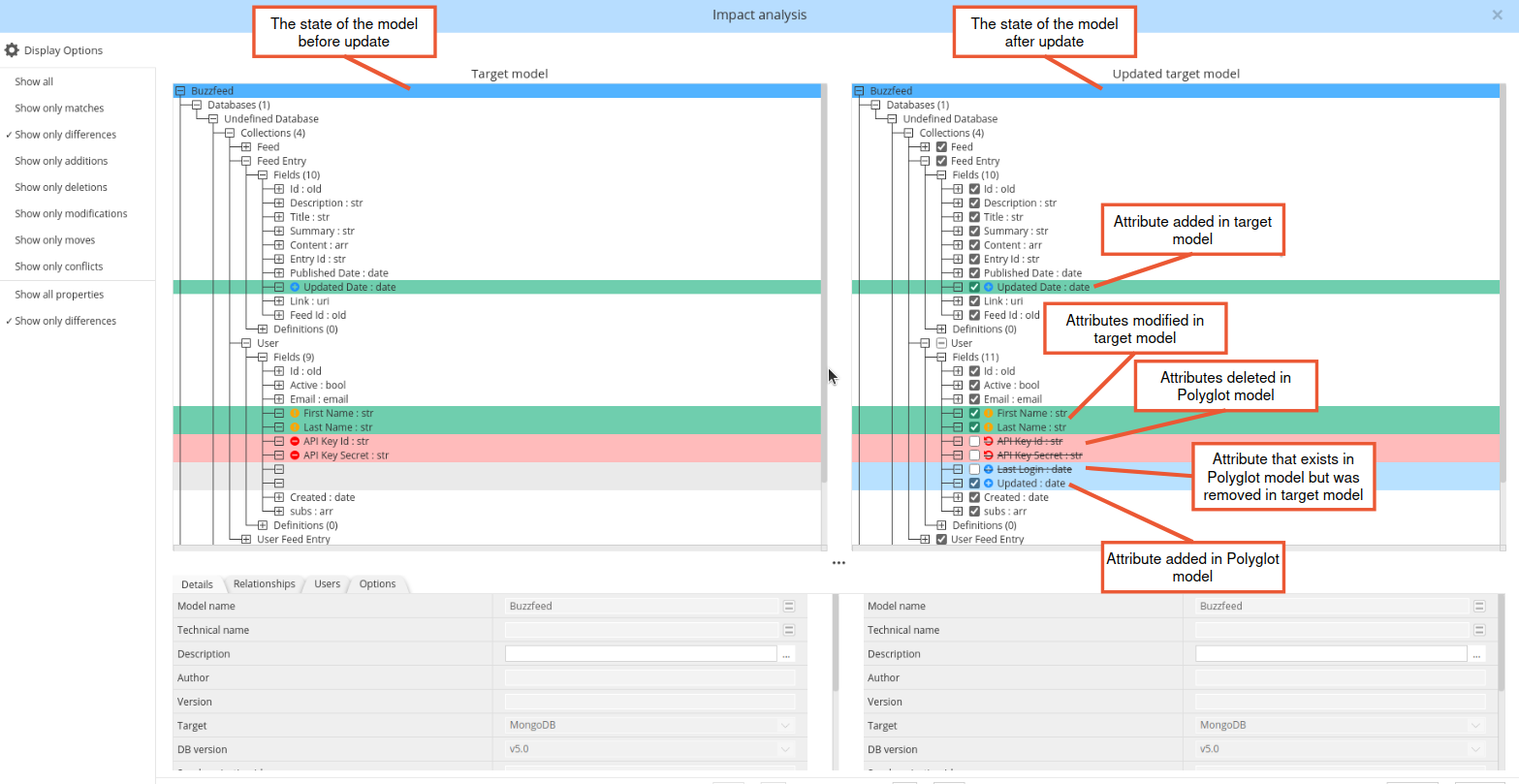
Color coding and badges help you understand additions, deletions, and modifications:
-
turquoise: deviations in the target model, either:
- insertion of target-only attributes (plus sign + in blue badge)
- or modification of properties of existing polyglot attribute (exclamation mark ! in yellow badge)
-
red: deletions in the polyglot model (strike through font and x in red badge)
-
blue: attributes in polyglot model and
- were removed in target model (strike through font and plus sign + in blue badge)
- were added in polyglot model (plus sign + in blue badge)
Added, deleted, and modified attributes in the Polyglot model have blue, red and yellow colors respectively (as in the regular compare models window)
If you are not sure what type of difference it is and whether it is changed in the Polyglot model or target model, you can hover on the icon and read the tooltip.
In the impact analysis window it is also possible to restore attributes in the target model if they were deleted in the Polyglot model. In this case, attributes will be preserved and will work in the same way as attributes that were added to the target model. So the next time you update references to your Polyglot model, you will see them highlighted in turquoise.
To view what properties were changed in the target model you can select the attribute, and on properties panes below you can see properties with turquoise color.