

Handling when converting to a Polyglot model
Before looking specifically at technical names, it’s important to understand what "convert to Polyglot" means in Hackolade Studio and how it differs from "derive from Polyglot".
Model convert function
The feature to convert takes any existing model -- most commonly a physical model, but it can also be another Polyglot model -- and pushes its content to a Polyglot model. The user converts the currently open model into a Polyglot model.
For detailed information about this convert feature, consult this page.
During the convert operation, the user chooses between:
- making models dependent: the generated Polyglot model becomes the source (the parent, the master), while the original model becomes a derived model, just as if it had been generated from the Polyglot through a normal derivation;
- keeping models independent: the original model remains standalone and doesn't depend on the Polyglot.
Convert into a new or an existing Polyglot model
The user can also choose between:
-
creating a brand-new Polyglot model (simple convert), or
-
replacing an existing Polyglot model, with options to:
- overwrite it completely, or
- merge the converted content into the existing Polyglot model (convert and merge)
Let's now explore what happens with technical names based on the chosen options. This page describes the process of creating a new Polyglot model during a convert operation. For details about handling technical names during a Convert and Merge into an existing Polyglot, please consult this page.
No technical names by default during a convert operation
Important: when converting a model to Polyglot, the generated Polyglot model doesn't contain technical names:
- technical names from the source model are not transferred into the Polyglot model
- Polyglot naming conventions (even when active) are not automatically applied during conversion. You can always apply them afterwards to whole model via the naming convention options.
This ensures that no unintended naming logic is introduced into the Polyglot and that the user retains full control over where technical names belong. The Polyglot is always created in its simplest, cleanest form.
Note: When converting and merging into an existing Polyglot model that already has technical names, the technical names present in the target Polyglot are preserved, as described here.
Understanding how names behave during convert
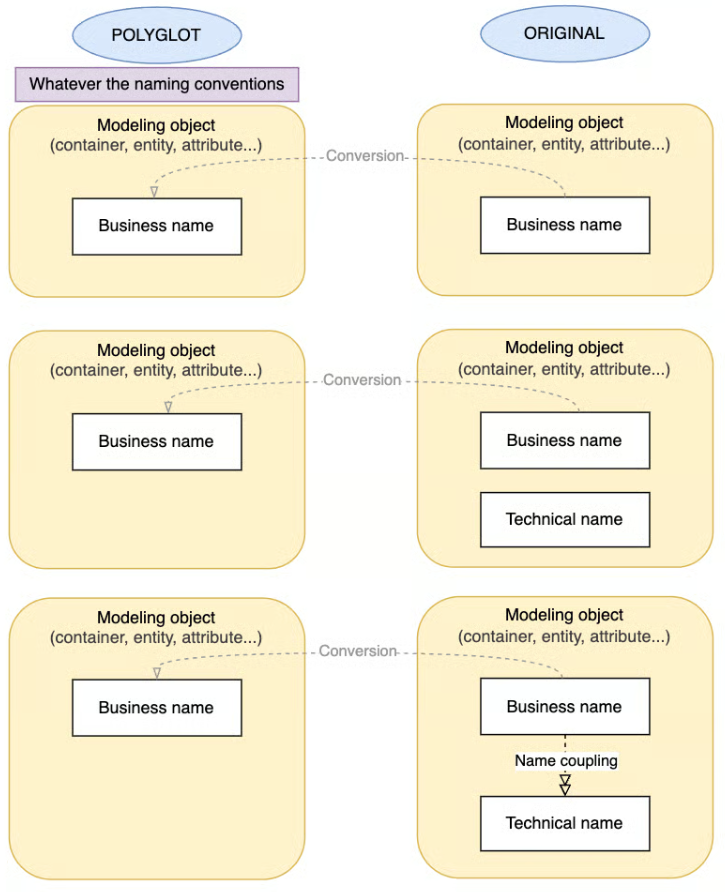
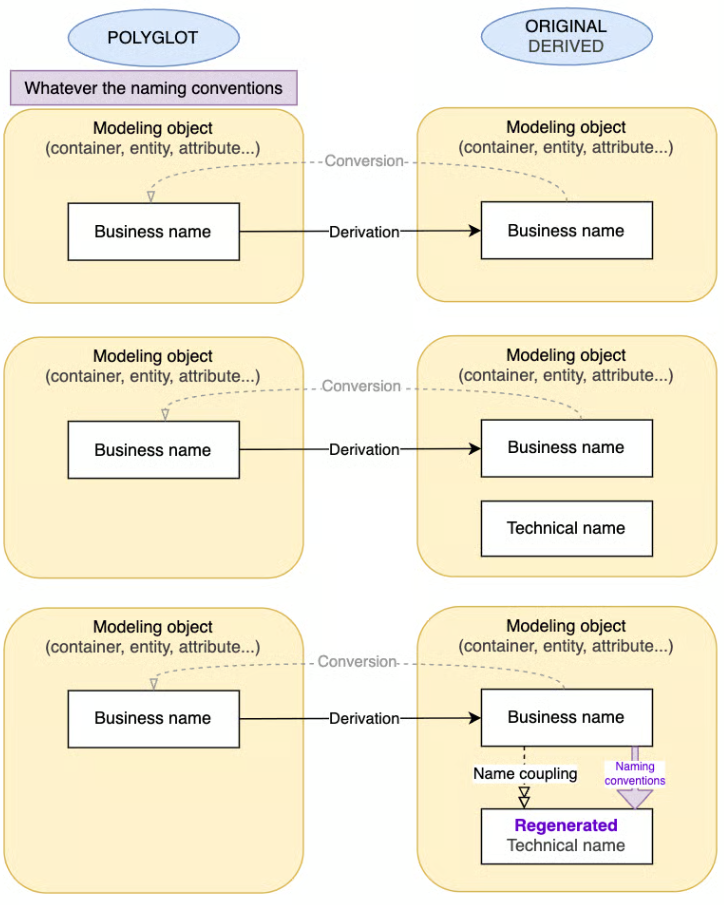
The diagrams below illustrate what happens to business names, technical names, and name coupling during a conversion to Polyglot, depending on whether the resulting models are kept independent or made dependent.
If the original model being converted contains technical names, they are preserved, after conversion, exactly as they were originally.
When the user chooses to keep both models dependent, these technical names are treated as target-level enrichments and remain local to the derived (original) model only. They do not become part of the Polyglot.
When models are kept independent
In this scenario, the Polyglot model is created as a standalone structure. The original model remains unchanged and continues to follow its own lifecycle.
We detail 3 common situations and how the original model behaves:
- modeling object has a business name only --> only the business name is transferred to the Polyglot. The Polyglot contains no technical name, regardless of its naming conventions.
- modeling object has both a business and a technical name, but uncoupled --> only the business name appears in the Polyglot. The technical name stays exclusively in the original model, still uncoupled.
- modeling object has a business name and coupled technical name generated from the business name --> the coupling remains active in the original model, but it is not reproduced in the Polyglot. The Polyglot receives only the business name.
When models are made dependent and the original model becomes derived
If the user chooses to make the models dependent, the Polyglot becomes the source (the parent, the master), and the original model becomes a derived model.
We detail 3 common situations and how the original model behaves:
- modeling object has a business name only --> after convert, its business name becomes derived from the Polyglot value.
- modeling object has both a business and a technical name, but uncoupled --> after convert, its business name becomes derived from the Polyglot value. Additionally, it keeps its technical name in the derived model, as an enrichment, unrelated to the Polyglot model.
- modeling object has a business name and a coupled technical name, generated from the business name --> after convert, its business name becomes derived from the Polyglot value. Its technical name is regenerated according to the current target naming convention rules, since coupling still applies on the derived side (see important note below).
Important note about name coupling
If some modeling objects in the original model have name coupling enabled (business-to-technical or technical-to-business):
- the coupling state is preserved during conversion.
- the coupled value is regenerated based on the current naming-convention rules defined for the target. (If the naming rules have changed since the model was created, the regenerated technical name may differ from its previous value.)
If a particular modeling object should not regenerate its names, we recommend uncoupling its names before running the conversion.
Modeling objects whose names were not coupled keep their exact values without regeneration.